
EFTPOS (Electronic Funds Transfer at Point of Sale) is how NZ businesses take card payments in person. EFTPOS terminals can accept a range of payment methods including EFTPOS debit, Visa and Mastercard, and contactless, but each is processed differently. This guide covers what you’ll pay, how payments settle and how to choose a terminal and provider.
Key takeaways: EFTPOS in NZ
- What is EFTPOS? Electronic payment at checkout, commonly associated in NZ with domestic debit card payments.
- Is EFTPOS free for businesses? No. Terminal and network costs apply, although standard domestic EFTPOS debit transactions generally have no per-transaction Merchant Service Fee (MSF).
- Is tapping the same as EFTPOS debit? Not necessarily. Visa and Mastercard contactless debit payments use card schemes and generally attract an MSF.
- When do payments settle? Daily settlement operates 365 days a year, including weekends and public holidays. Your provider and settlement schedule determine when funds arrive.
- What do you need to get started? A suitable terminal, network connectivity and an approved merchant facility.
What is EFTPOS?
EFTPOS means Electronic Funds Transfer at Point of Sale. It allows a customer to pay electronically at checkout, with the payment authorised through the payment network and funds settled to your business account. People often use “EFTPOS” to mean any card payment or the terminal itself. For your business, the important distinction is between the terminal and the payment method: one terminal can accept several payment types, each with its own costs.
What is the difference between EFTPOS, debit and credit cards?
- Domestic EFTPOS debit: A payment from a linked cheque or savings account through NZ's domestic EFTPOS system.
- Visa or Mastercard debit: A debit card that can be used online or for contactless payments, and for domestic debit. The processing route affects your fees.
- Credit card: A payment using the cardholder's credit facility. Merchant processing fees apply.
- Mobile wallet: A way to present a supported debit or credit payment card using a smart device, typically a phone or watch.
Payment types compared
| Payment type | Presentation | How it's processed | Per-transaction MSF | Who charges you | Settlement |
|---|---|---|---|---|---|
|
Domestic EFTPOS debit
|
Inserted or swiped, cheque or savings selected | Domestic EFTPOS network | None | N/A | Daily |
|
Visa or Mastercard debit |
Tapped | Card scheme network | Applies | Your merchant services provider (usually your bank) | Daily |
| Credit card | Tapped or inserted and credit selected | Card scheme network | Applies | Your merchant services provider (usually your bank) | Daily |
|
Mobile wallet (Apple Pay, Google Pay) |
Tapped |
Card scheme network |
Applies | Your merchant services provider (usually your bank) | Daily |
|
Other payment methods e.g. AMEX, Alipay |
Varies | Third-party provider | Set by the provider | Third-party provider | Varies |
Rates depend on your agreement, so check your merchant statement for the exact figures. Learn more about the differences between these payment methods and how much they cost you to process in our guide Why do different payment types cost different amounts to accept?
What does EFTPOS cost for a business in NZ?
EFTPOS costs for an NZ business usually come from three places: terminal rental or purchase price, a network service fee, and merchant service fees on card payments. Your total depends on your terminal, contract, merchant services provider and the mix of payments your customers make. Some providers itemise each cost. Others bundle them into one price, sometimes with a minimum monthly fee or turnover attached. Neither is automatically cheaper, so compare the total, not the headline.
Terminal rental or purchase
Rental pricing depends on the device and contract term. Ask what’s included: support, servicing, software updates, and a replacement if the terminal fails. If you’re buying, check who handles ongoing software maintenance and PCI compliance. Free rental offers are common, and they vary. Some are introductory. Others are ongoing but come with conditions, such as a minimum monthly fee or using the provider’s own merchant services. Check which applies before you sign. Eftpos NZ offers free EFTPOS rental for new customers with no minimum turnover.
Payment network fee
The Verifone Network fee is $15 + GST per terminal per month, shown as its own line in every Eftpos NZ quote. If a plan shows a $0 network fee, check where the cost has moved: higher processing rates, a minimum monthly fee, or a requirement to use the provider’s own merchant services.
Merchant service fees (MSF)
An MSF is charged on applicable card payments by your merchant services provider. That’s usually your bank, or your EFTPOS provider if it bundles merchant services into its price. Rates depend on your agreement, the card type and how the payment is processed.
- Inserted EFTPOS debit: generally no per-transaction MSF, though terminal and network costs still apply. If a plan bundles card processing, check this still holds.
- Contactless debit and credit cards: generally attract an MSF, which varies by card type.
- Third-party payment methods, such as Alipay+ and WeChat Pay: may have their own agreements, charges and settlement arrangements.
Rates aren’t always fixed for the life of an agreement, so check when and how they can be reviewed. With Eftpos NZ, your merchant services stay with your own bank, so if your rate changes you can shop around without replacing your terminal.
Setup, connectivity and other costs
Your bank may charge to set up a merchant facility. Other costs can include mobile connectivity, receipt paper, optional features and short-term hire. Check contract length, renewal and cancellation terms alongside the monthly price.
How to compare EFTPOS quotes
Copy this table and fill in one column per provider. Compare the total monthly cost, not the headline price.
| Item | What to check | Provider A | Provider B |
|---|---|---|---|
| Terminal rental or purchase, and network fee | Rates per month. If either shows $0, where has the cost moved? Check processing rates, minimums and merchant services lock-in. | ||
| Connectivity and add-ons | Mobile data, receipt paper, optional features, short-term hire | ||
| POS integration | Does it work with your POS? Is there a setup fee or monthly charge? Who supports it when something breaks, the provider or the POS vendor? | ||
| Surcharging | Is it included or an add-on? Can you set different rates by card type rather than one flat rate? Can you change or switch it off if your costs or the rules change? | ||
| Payment methods | Which cards and wallets does the terminal accept out of the box? | ||
| Estimated processing fees | Based on your actual mix of card payments, not an average rate | ||
| Minimum monthly fee or turnover | Is there a minimum, and what happens if you fall short? | ||
| GST | Are the prices quoted including or excluding GST? Compare every provider on the same basis. | ||
| Total monthly cost | Add the fixed costs and estimated processing fees. | ||
| Fixed or variable | Which costs are fixed for the term, and which can change? | ||
| Contract terms | Length, renewal and cancellation | ||
| Your bank | Can you keep your bank, and what does it cost to leave? | ||
| Support | Who services the terminal: an on-site technician or phone-only? Also check software updates and how fast a faulty terminal is replaced. |
Every Eftpos NZ quotes sets out every cost month by month. Get a free quote.
When did EFTPOS start in New Zealand?
BNZ introduced EFTPOS in New Zealand through a petrol-station pilot in 1985. EFTPOS adoption expanded through the late 1980s and 1990s as businesses and customers became more comfortable with electronic payments. Since then, payment acceptance has developed from swipe-and-PIN transactions to chip cards, contactless payments, mobile wallets and more. For today's businesses, that means more ways to take payments, but also more payment types to understand.
How does EFTPOS work?
An EFTPOS terminal sends a secure payment request through the payment network to obtain authorisation. Your merchant services provider then arranges settlement into your nominated account. Approval at checkout and settlement into your account are separate stages.
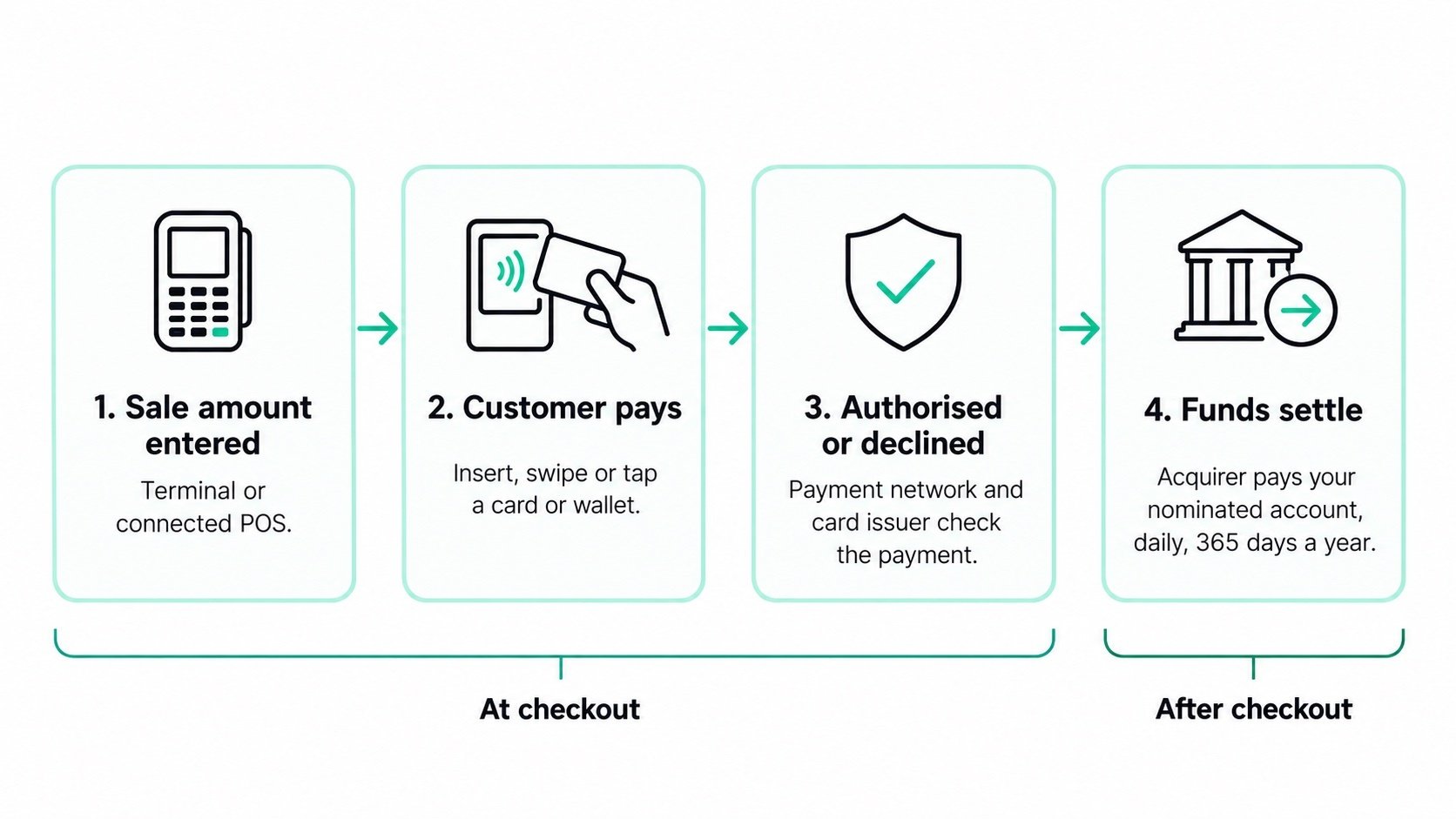
- You enter the sale amount. Enter the amount on your terminal, or send it automatically from a connected point-of-sale (POS) system.
- Your customer presents their card or wallet. They swipe, insert or tap, depending on the card, terminal and payment methods you have enabled. They complete any required PIN or device authentication.
- The payment is authorised or declined. The terminal sends an encrypted request through the relevant network. The card issuer checks the payment, including available funds or credit and security checks, and returns a response.
- The funds settle to your business. Approved transactions are included in the relevant settlement period. Funds are settled into your account according to your merchant agreement.
When do EFTPOS payments reach your account?
Daily EFTPOS settlement operates 365 days a year, including weekends and public holidays. Your acquirer's settlement schedule and your terminal's settlement cut-over determine which payments are included and when you can access the funds. Most card payment amounts settle to your account around 10-11 pm every day. Some payment methods, such as American Express, gift cards and other third-party services settle separately or later. Transactions taken after your cut-over can fall into the next settlement period. See our how settlement works.
Who is involved in an EFTPOS transaction?
An EFTPOS payment involves your customer, you (the merchant), your terminal provider, the payment network and the financial institutions that authorise and settle it. Card schemes or other payment providers may also be involved.
- Customer: Presents a card or supported wallet and authorises payment
- Merchant: Your business, which accepts payment and receives the funds
- EFTPOS provider: Supplies your terminal, payment software and support
- Payment network: Connects the terminal with the institutions involved in processing the payment
- Acquirer: Provides your merchant facility and arranges settlement to your nominated account
- Issuer: The customer's card provider, which approves or declines the payment
- Card scheme or third-party provider: Sets the rules and supports processing for its payment method, where applicable
Knowing these roles helps you contact the right team. Terminal faults usually start with your EFTPOS provider. Questions about your MSF or settlement account usually start with your acquirer (usually a bank).
What are the benefits of EFTPOS for businesses?
EFTPOS gives your customers a convenient way to pay, reduces cash handling and creates transaction records that help you reconcile sales.
- Keep checkout moving. Electronic payments reduce the need to count cash or find change. Contactless acceptance adds a quick payment option for eligible transactions.
- Offer customers more choice. Accepting supported cards and wallets helps you serve customers who do not carry cash.
- Reduce cash-handling work. Less cash on site means less counting, storage and banking. Electronic payments still require appropriate security and fraud controls.
- Make reconciliation easier. Terminal and payment-platform reports help you compare transactions, refunds and settlements with your sales records.
- Understand your payment costs. Separating fixed terminal and network costs from payment-method fees helps you budget and compare providers.
Which type of EFTPOS terminal do you need?
Choose your EFTPOS terminal based on where you take payments, your connectivity and whether you need POS integration.
Countertop terminals: payments at a fixed checkout
A countertop setup suits businesses taking payments in one place, such as a retail counter. Check its power requirements, connectivity and available backup options.
Portable and mobile terminals: payments where your customers are
A battery-powered portable or mobile terminal lets you take payments at tables, across your premises or at offsite locations. Depending on the model, it can connect through Wi-Fi or a mobile network. Check coverage, battery life and charging arrangements before choosing.
Integrated EFTPOS: connect payments to your POS
Integrated EFTPOS links your terminal to compatible POS software. The POS sends the purchase amount to the terminal and receives the payment result, reducing manual entry and helping keep sales and payments aligned.
Android-based terminals: payments and supported business apps
Android-based terminals combine payment acceptance with touchscreen operation and supported apps. Available functions depend on the platform, provider and configuration. Ask which apps and payment methods are available for your chosen terminal.
How do contactless and mobile payments work?
Contactless card and wallet payments use Near Field Communication (NFC) to exchange payment information when your customer taps a compatible card, phone or watch on the terminal.
Your terminal needs suitable hardware and an enabled contactless facility. Eftpos NZ's current terminals are contactless-enabled, with activation arranged through your bank.
Do customers need a PIN for contactless payments?
Eligible contactless card payments under $200 can be made without a PIN. Verification requirements depend on the card, issuer, terminal and transaction. Mobile wallets can use device authentication, so a phone payment does not always follow the same PIN requirements as a physical card.
Are Apple Pay, Google Pay, Alipay and WeChat Pay the same?
No. Apple Pay and Google Pay can present supported payment cards for contactless transactions. Other payment services, including Alipay and WeChat Pay, may use different acceptance flows, such as QR codes, and require separate setup. Ask your provider which methods your terminal supports and what agreements you need before advertising them to customers.
Can you use your phone as an EFTPOS terminal?
Yes, a supported Tap to Pay or Tap on Phone service can turn a compatible smartphone into a contactless payment acceptance device. It is not a like-for-like replacement for every traditional EFTPOS function. Check supported phones, payment methods, PIN requirements, refunds, receipts, connectivity and pricing. Phone-based acceptance generally cannot read a swiped or inserted card. Monthly charges and transaction fees depend on the provider. Victa softPOS from Eftpos NZ is coming soon. Sign up for updates and learn more.
What is a payment surcharge?
Some businesses add a surcharge to contactless and credit payments to recover their Merchant Service Fees. In New Zealand, a surcharge can’t be more than your actual cost of accepting that payment, and that cost differs by card type. Look for surcharge settings that match your costs rather than one flat rate. Surcharging is a business decision, not a compulsory charge set by your bank, card scheme or EFTPOS provider. You can also choose to absorb payment processing costs in your margins or account for them in your pricing.
What should you consider before surcharging?
The Commerce Commission’s guidance is that surcharges should reflect payment acceptance costs, be clearly disclosed and give customers a way to avoid them. Before enabling surcharging:
-
Check your actual processing costs. Review your merchant statement and ask your acquirer to explain your MSF for each payment type. Base any surcharge on those costs rather than copying another business’s rate. Review it when your fees change, and do not use it to make a margin. See how to set up surcharging and set your rate..
-
Tell customers before they pay. Clearly display which payment methods attract a surcharge and the applicable rate or amount. Train your team to explain it so customers can make an informed choice, rather than discovering the surcharge at the final step. You can download and order surcharge signage from Eftpos NZ .
-
Offer a surcharge-free option. Standard domestic EFTPOS debit payments generally have no per-transaction MSF and provide an alternative to surcharged credit or contactless payments. Explain that swiping or inserting an eligible card and selecting cheque or savings is different from tapping it.
Is surcharging being banned in NZ?
The Government proposed a ban on surcharges for in-store EFTPOS, Visa and Mastercard payments. However the proposal has not taken effect.
Frequently asked questions about EFTPOS in NZ
What does EFTPOS stand for?
EFTPOS stands for Electronic Funds Transfer at Point of Sale. It describes electronic payment at checkout, commonly associated in New Zealand with domestic debit card payments.
Is EFTPOS free?
EFTPOS is not free for businesses. Terminal and network costs apply, although standard domestic EFTPOS debit transactions generally have no per-transaction MSF. Credit and contactless payments can attract processing fees.
Is EFTPOS the same as payWave?
No. Domestic EFTPOS debit and contactless payments can be accepted on the same terminal but use different processing routes and can have different fees.
Do EFTPOS payments settle on weekends and public holidays?
Yes. Daily EFTPOS settlement operates 365 days a year, including weekends and public holidays. Your bank and settlement cut-over determine when funds arrive. Some third-party payment methods may settle separately or later.
Do you need a merchant account for EFTPOS?
You need an approved merchant facility to process and settle payments. This is not simply an ordinary business bank account. With Eftpos NZ, you arrange your acquiring bank relationship separately from your terminal subscription.
How do you get an EFTPOS terminal for your business?
Choose a provider and terminal, arrange an approved merchant facility, and have your terminal configured and tested. Your provider can guide you through connectivity, staff training, reporting and support. Setup time depends on approval and equipment availability.
Can an EFTPOS terminal take online payments?
In-person EFTPOS acceptance is different from online checkout. To accept payments through your website, you need an appropriate online payment service or payment gateway. Remote payment options such as Pay By Link and Virtual Terminal may also suit your business.
How do I get EFTPOS pricing for my business?
Tell us about your business and our team will put together a comprehensive, free quote. Get your free EFTPOS quote.

Comments